Configure statistics in budget groups
Budget groups are driven by DEPT dimension settings. The Budget Statistics driver includes Patient Days, Nursery Days, other IP and OP department statistics, and Statistics generated from Supplemental drivers—43 Budget Statistics Supplement, 44 Budget Service Line Supplement. The supplemental drivers can be used to drive monthly increases and decreases for other departmental statistics.
The system populates historical information. You can adjust the current year projected remaining volumes and the next year budget by percentages or amounts.
TIP: Budget groups display in alphabetic order. Departments display in numerical order. Each budget group block is expandable or collapsible by clicking the caret icon >.
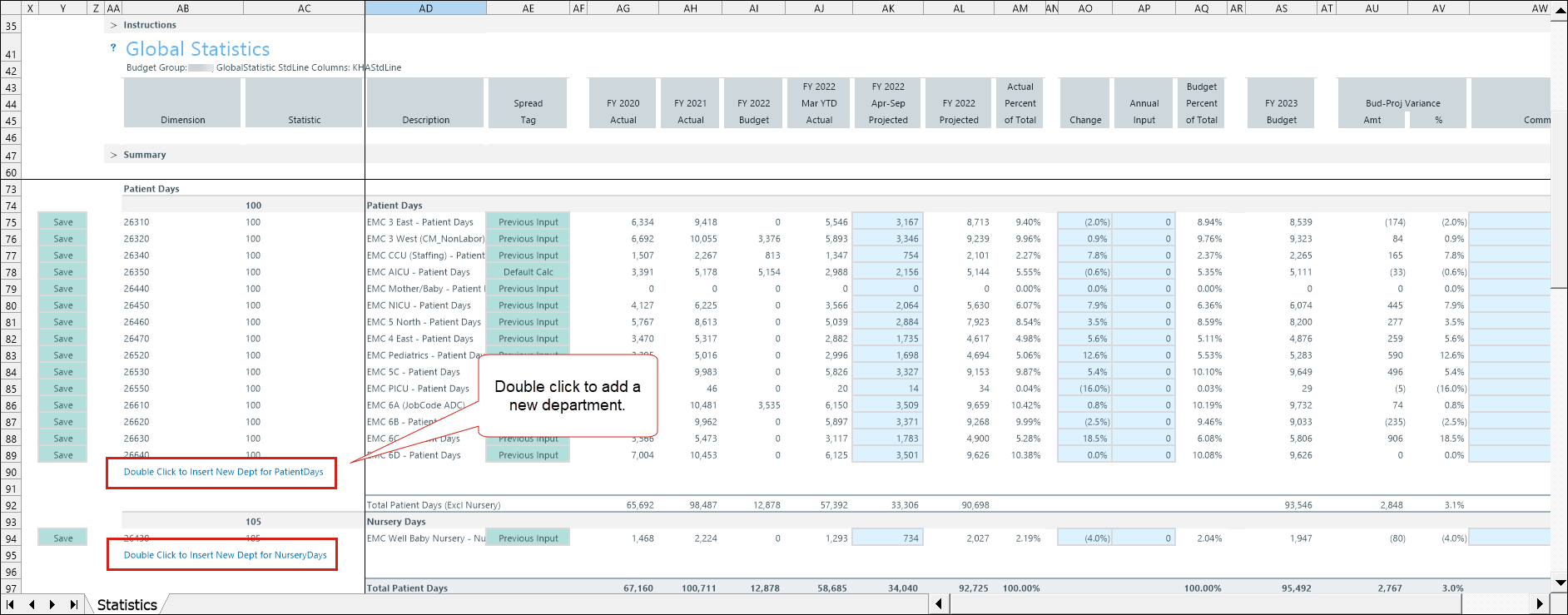
Add a new department
When you add a new department, the system validates DEPT and ACCT entries against dimensions in the BudgetYYYY_statistic table. This means you do not have to worry about manually entering an invalid department. The system automatically validates the entries.
TIP: Accounts with the GlobalStatistic setting—in the ACCT dimension StdLines—populate the various driver sections. An alert notification appears in a driver section, such as Patient Days, when the GlobalStatistic calculation method is not assigned in the ACCT dimension.
-
Double click Double Click to Insert New Dept for [account].
-
Select a calculation method when adding a new account. The following options depend on which section you are updating.
-
Add Input Monthly Row: Used to budget custom spread volumes.
NOTE: Add Input Monthly row fields populated from historical actuals or prior budgets are read-only.
-
Add Patient Day Row: Provides six methods to determine the spread of volumes.
-
Add Detail Row: Provides six monthly spread options for budgeting.
-
-
Double click + Select DEPT and choose a department.
-
Adjust the current year projected remaining volumes (column AK) and next year budget by adding a percentage (column AO) or amount (column AP).
-
Right click the [BUD23] 03 Budget Statistics tab header and select Save Data Only.
The Statistics Supplement sections are auto-populated from entries made to the 43 Statistics Supplement and 44 Service Line Supplement drivers. Instructions for configuring these drivers are found within the drivers (in the application).
IMPORTANT: Supplemental statistics must be deleted prior to deleting a budget group block. If not, the budget group will persist.
Budget Statistics driver columns
| Category | Description |
|---|---|
| Dimension | DEPT and ACCT numbers from the respective dimension tables. |
| Statistic |
A measurable unit of activity used to quantify hospital operations—such as admissions, patient days, worked days, or discharges. Key statistic: primary volume driver Non-key statistic: supporting operational measures |
| Description | Statistic description. |
| Spread Tag |
|
| FY [year] Actual |
|
| FY [year] Actual | Actual volume from one fiscal year ago. |
| FY [year] Budget | Current year budget. |
| FY [year/month] YTD Actual | Current year/month YTD actual volume. |
| FY [year/month-month] Projected | Current year projected volume for the remaining months. |
| FY [year] Projected | Current year projected volume. |
| Actual Percentage of Total | Percentage change from previous year. |
| Change |
The difference between the actual projected budget and the current year in percent format. Project next years budget by a percentage change. |
| Annual Input |
The difference between the actual projected budget and the current year in dollar amount. Project next years budget by manually entering an annual amount. |
| Budget Percent of Total | Budget percent of total. |
| FY [year] Budget | The budget total for the next year. |
| Bud-Proj Amt | The difference between the budgeted amount and the projected amount. (Calculated as Budget - Projection) |
| Variance % | The percentage difference between two values. |
| Comments | Add notes for the department line item. |
| Spread Method |
Select a methodology to spread the statistics.
|
| Monthly budget columns | Current fiscal year monthly budget statistics. |
| Check Total | A validation total used to confirm that monthly budget values reconcile to the overall total. |
| KHACMDimGrp | Indicates whether a department-based calculation method is applied instead of the default account standard line (KHAStdLine). |
Budget Statistics configuration includes the following tasks:
